
WMTS
WMTS (Web Map Tile Service) is an Open Geospatial Consortium standard for publishing map tiles on the web. A WMTS server serves a map as a fixed pyramid of tile images and publishes an XML capabilities document that describes which tiles exist, in which projection, and at which zoom levels. A GIS client reads that one document and configures itself, so you do not have to enter tile URLs or projection settings by hand.
The standard was published as version 1.0.0 in 2010. It is still one of the most widely supported ways to add a remote basemap in desktop GIS software.
Why tiles instead of images
The older WMS standard renders a new image for whatever bounding box the client asks for. Every request is different, so the server renders again on every pan and zoom, and almost nothing can be cached.
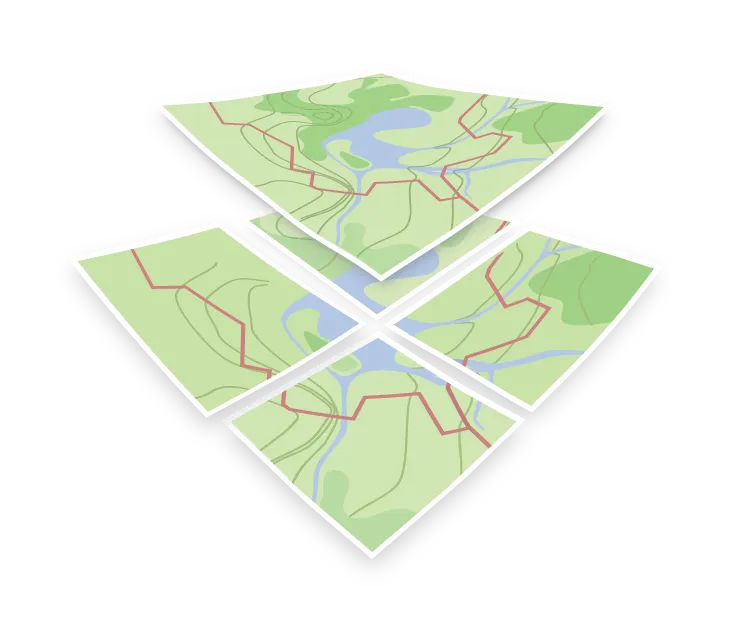
WMTS splits the map into a grid of small, fixed images, usually 256x256 or 512x512 pixels, addressed by zoom level, row, and column. The tiles can be rendered ahead of time, or rendered on the first request and then cached. Either way, every client looking at the same area requests the same URL, so tiles can be cached by the server, by a CDN, and by the browser. This is what makes WMTS fast enough for interactive maps, and it is the same approach used by the XYZ tiles in web map libraries.
WMTS now has a successor, OGC API – Tiles. It is a lighter standard built on REST and JSON, and it can serve vector tiles as well as images.
Tile matrix sets
A tile matrix set is the grid definition: the coordinate reference system, the origin, the tile size, and the scale at each zoom level. Tiles from two different servers line up only if both use the same tile matrix set.
Most web maps use WebMercatorQuad: Web Mercator (EPSG:3857), 256x256 pixel tiles, the origin in the top left corner, and one tile at zoom 0 that splits into four at each following level. A service can publish several tile matrix sets for the same layer, and the capabilities document lists all of them.
Inside a tile matrix, three numbers identify a tile:
| Parameter | Meaning |
|---|---|
TileMatrix |
The zoom level, as named in the tile matrix set |
TileRow |
Row index, counting down from the top |
TileCol |
Column index, counting right from the left |
For WebMercatorQuad this is the same ordering as the {z}/{x}/{y} convention, with TileCol as x and TileRow as y. TMS is a different tiling convention that numbers rows from the bottom, which is a common reason a map appears flipped vertically.
WMTS operations
| Operation | Required | What it does |
|---|---|---|
GetCapabilities |
Yes | Returns the XML document describing layers, formats, tile matrix sets and URL templates |
GetTile |
Yes | Returns a single tile image |
GetFeatureInfo |
No | Returns attributes of the features at a pixel within a tile |
The standard defines three request encodings. KVP puts the parameters in the query string, RESTful encoding puts them in the URL path, which looks like an ordinary XYZ tile URL, and SOAP sends the request as an XML message but is rarely used. A service can support one or more of them, and the capabilities document tells you which.
Connecting to a WMTS service
Every map in MapTiler Cloud publishes a WMTS capabilities document. This URL is all a GIS client needs:
https://api.maptiler.com/maps/{map_id}/WMTSCapabilities.xml?key=YOUR_MAPTILER_API_KEYFor example, the OpenStreetMap style built on the OpenMapTiles schema:
https://api.maptiler.com/maps/openstreetmap/WMTSCapabilities.xml?key=YOUR_MAPTILER_API_KEYTo add it to QGIS:
- Open Layer > Add Layer > Add WMS/WMTS Layer, then click New to create a connection.
- Name the connection and paste the capabilities URL into the URL field, with your own API key in place of
YOUR_MAPTILER_API_KEY. - Click OK, then Connect. QGIS reads the capabilities document and lists the available layers and tile matrix sets.
- Select a layer and click Add.
The same URL works in any other WMTS-capable desktop GIS or server product.
WMTS and vector tiles
WMTS was designed for images, not vector data, and the GIS clients that use it expect images, so an OpenMapTiles vector tileset is normally not served over WMTS. You have two options:
- Raster tiles over WMTS: Render the vector tiles to images and publish those. This is what the capabilities URL above serves, and it is the option to use for GIS software without vector tile support and for any client without WebGL. See generating raster tiles.
- Vector tiles over XYZ: Web map libraries request
.pbfvector tiles by{z}/{x}/{y}and style them in the browser. See displaying a map.
Both use the same Web Mercator tiling scheme, so you can mix them in one map.
Self-hosting a WMTS endpoint
If you generate and host tiles yourself, normally from an MBTiles file, each of the tile servers documented here provides a WMTS endpoint:
- MapTiler Server exposes WMTS next to WMS and OGC API Tiles, and runs on your own hardware with a web administration interface.
- TileServer GL provides a WMTS endpoint for each configured style, next to its vector and raster tiles.
- TileServer PHP implements the OGC WMTS standard for pre-rendered raster tiles and runs on ordinary PHP hosting.